Saturday, February 09, 2008

Charlie Chaplin Speaks

Whoever thought the great Chaplin was demigod of just silent-films... Listen to this clip, and you might change your mind: He speaks well, maybe better than most contemprary actors! Before you rebuff it, remember there weren't any teleprompters in those days! He must have worked really hard for this shot.

Listen to every word of his: it's filled with bitter truth! And if you haven't had your morning black coffee yet, bet this' gonna substitute for your morning bitterness!


Tuesday, February 05, 2008

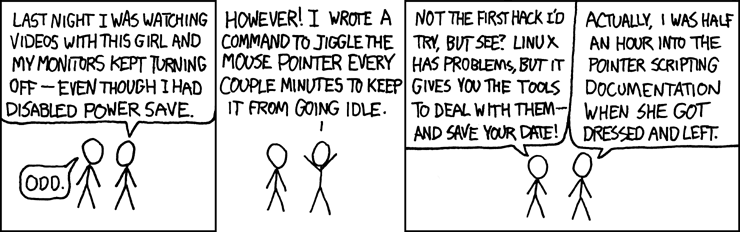
Fear of my first date!

Just what I fear would happen on my first date...

via: A webcomic of romance, sarcasm, math, and language: xkcd!

Thursday, January 31, 2008

F@!#$ed up, yet again

... yes, I just don't seem to get along with keeping up on these birthdays thing :(

At times I get sucked up so much in my own little(???) (stupid) world, that I soon become disconnected from reality. WTF! Aaggrrhhh!!!! I forgot my sweetest little brother's birthday yesterday. In past 12+ years there wasn't a single birthday of his in which we didn't have a blast. And how the f!@$ can I forget it, all the while he was waiting that I'll call, or even better land up in India and give him the pleasantest of surprises! But alas, stupid me, completely forgot the day and finally he couldn't hold up himself any more and buzzed me to remind that it's his birthday.

Sometimes, we do stupid things... in our quest to make our closest happy, we completely forget the present moment and the small things that matter a lot :( But thank God, he's more forgiving than I am and so he has forgiven me, at least for the moment! Love you bro, muuaahh!

How dumb :'( How Cheap :'( How stupid :'( How !@#$ed up :'( I trust I'll soon become a legend on this :(

see also: Have I lost my minds?

.

Thursday, January 24, 2008

KOrganizer and Google Calendar Sync

Yet once again, due to compatibility issues, when my Thunderbird upgraded, Lightning stopped working!!! !@#$ and as usual, lost my calendar :( I was kinda liking the newer version of lightning for it looked more polished and had more controls, until it crashed.

Last time Shaw (aka Amit, but I prefer Shaw!) suggested using korganizer, it looked sleek but I wanted something that can now sync my calendar with online service, say Google Calendar. So if something crashes, I don't loose all my data. I failed to find a decent tutorial on how to do that. Until, today, totally frustrated, I Googl'ed harder. But this time around, it wasn't hard to find one. After failed attempts to get sync working with tips from 4-5 tutorials and already invested half a day in it, just before retiring the tought, I picked up one more tutorial. Just 2 para of how to get it working. DAMN! This seems cool!

So here I go.... and BINGO! Got the damn thing working! This means, even if my local app crashes, I would still have my online-calendar safe! Or so I think!

For the curious souls, here's an extremely short version of the original tutorial I read.
  1. Download, un[tar|zip] GCALDaemon (requires JRE >= 1.5)
  2. Execute /whatever_path/standalone-start.sh (if you are going to use it regularly, better add it to your startup scripts)
  3. Find your private iCal URL by going to Google Calendar by clicking Settings -> Calendars -> Your Calendar and clicking the ICAL button at the bottom.
  4. Replace http://www.google.com with http://localhost:9090
  5. Create a new KOrganizer calendar by going to the Calendar tab, clicking the Add button, selecting "Calendar in Remote File,"
  6. Past the private URL in the "Download to" and "Upload to" fields
  7. Check Automatic Reload -> Regular Interval
  8. Check Automatic Save -> On Every Change

From here on, the 2 calendars will be in sync! But note that it might take a few minutes to get the changes synced. But unlike what original tutorial mentioned, I could get all adds/mods/dels from both, KOrganizer and Google Calendar, working and reflected correctly!

Phew! Wish I don't have to loose my calendar anymore now!

For more details, you are directed to read Calendaring: Google Calendar and KOrganizer

Wednesday, January 09, 2008

Book Reviews: Dromey, TPOP, Art of Intrusion, Broker and CLR

During this winter break, I had the privilege of reading some of the most excellent, legendary and exciting books. I have been putting off some of these books for many years now! That's the best part of coming back to academia: you get a chance to read all the books you couldn't in good old schooling days!

Each of these books deserve their own posts, and this post might not do the justice to their value. But I'm too lazy to do it right now.

0. How to Solve it by Computer, by R.G. Dromey

The story dates back to 1999, during my second year of Engineering at PICT. I had the privilege to be taught by one of the most brilliant and talented faculties at PICT, Ramprasad Joshi (aka RaJo).

I would rate him as the _only_ person in PICT who knew _how_ to write an algorithm. And the only person back then at PICT who knew Unix. Always smiling, unlike other geeks you would get to see, spending most of his non-teaching time in what was known as 'The PICT Server Room' with his terminal and an assorted collection of exotic books. Wish I had spent more time with him then :( What came with this affluent personality was a store-house of good advices. Very few people had the knack and patience of grasping and coming to terms with his abstract ideas, a common problem amongst geeks. But for me and my chaddi-buddy, Anna (aka Arun), he unknowingly changed the way we would program for the rest of our lives.

During one of the lectures he made a very inconspicuous comment about the worth of this book. But I didn't miss it. The title was exciting to me, so the very next day I got hold of this book, never to open it until a few days back! For almost a decade it was lying in my collection. With hopes of getting an opportunity to read it, I packed it along my choicest books to get along from India. It wasn't until I read few pages I realized that this is one of the most under-appreciated computer books! Am glad I used my precious space and weight on this book.

Lucid and fluent, the algorithms and design notes on each of them are just perfect and very understandable. Finding square root of a number with O(lg n) complexity, finding all the prime factors of a given number, generating primes, generating all permutations of a given set, searching sorting, etc. Though this book is NOT a premier on algorithms, it most certainly is one of the best books on how to solve a lot of common everyday problems with computer, aptly, as the title suggests! Now I wish I should have read this book long back. I'm almost halfway through and have every intention of going through the very last page.

Each section solves a commonly encountered problem, and doesn't just thrusts algorithms at you, and leave you to wonder why certain choices were made. Rather, Dromey, starts with the most obvious-n-naive (and often most inefficient) solutions. He then, carefully eliminates each of the inefficiencies, making the algorithm more efficient and resilient. After multiple iterations through pages, what you get in end is the most efficient way to solve a problem! And since you have improved it along the way, when asked, you can say *exactly* why you made certain choices!

The only other book that I ever liked for algorithms was Data Structures and Algorithms, by Aho, Ullman and Hopcroft. Many people find this book to be too esoteric and incomprehensible. To me, this is the most lucid, concise and precise books on algorithms. Another excellent book on algorithms is Computer Algorithms by Horowitz and Shani. Both recommended to me by my senior Taklu.


1. The Practice of Programming, by Brian W. Kernighan, Rob Pike
This book, more conveniently referred to as TPOP, is one of the books that my senior, Talku suggested reading, again maybe in 1999s. An avid reader, I bought this book too on the first opportunity. And it lay in my collection, with only few of its pages ever touched. It wasn't until now that I read past through most of this legendary book on design principles.

How to write programs, how NOT to write them, common pitfalls, debugging tips, testing, performance, interface design, etc. This book has it all in a nice small package. A must must must must read for anyone who makes his living by programming, irrespective of his platform and language. Some of the examples from the book are so freaking concise and beautifully implemented, that I went back to the first chapter and starting taking my own notes, as The Programming Pearls! (Naah, I haven't yet read Programming Pearls, by Jon Bentley)

2. Introduction to Algorithms, by Thomas H. Cormen, Charles E. Leiserson, Ronald L. Rivest and Clifford Stein
Commonly referred to as CLR, I should have read this book during my under grad days. I repent not doing so :( Too mathematical at times, this is a mini-bible for algorithm fanatics: detailed design and thorough analysis of each of the algorithms, second only to Knuth's classic and most authoritative work on algorithms: TAOCP.


3. The Art of Intrusion, by Kevin Mitnick
Getting down to lesser technically oriented books... This is a wonderful one of it's kind novel-like compilation of real world exploits that the real hackers from around the world have confided in to Mitnick. The best part about this book is that to enjoy it you don't have to be a computer geek. For most part, any layman can read it to understand what the heck is hacking all about, after all! For the technically oriented, it gives us an insight into the dark and elusive world of an art known as intrusion! A real page turner.


4. The Broker, by John Grisham
I took very long time to get through it, only because I started in middle of the semester. But it's a real page turner, and keeps you on toes about what's going to happen next. I wouldn't rate it above The Partner, but The Broker is an amazing novel nonetheless.


Damn! I wish I had read all of these books back in my engineering (under grad) days. It would have definitely helped me. So, if you get the chance, without missing a beat, jump on! Definitely worth all the time (and probably money) you would invest. I insist you buy these books, that way you would be more pressed to swift through them at least once. At which point they will definitely become irresistible!

Tuesday, January 01, 2008

New year bash!

A little humour for my technically oriented readers...
Situation: Atul talking to Vish...

Saturday, December 29, 2007

Why vi: The programmers' true editor

--- Update Thu 01/21/2016 ---
I have been getting quite a few (actually a lot of) hits on this 9-yr old post. The post that linked it didn't do it in the right spirit, the author, she clearly didn't read the post even a little bit and blindly linked it to her blog going only by the URL! So I want to clear the air for my readers here. Just so you don't continue reading with the wrong mindset of:
"This Shaolin a__hole thinks he's a great programmer because he uses ancient vim; and he thinks whoever doesn't, is a loser!"
Rather, really the one and only intent of this post is to put you in the mind-frame of
"Let me read why vi is a really great editor & why it's worth learning vi!"
If you continue with the intended motive of this post, you will have learned something about an editor you don't often hear much about anymore.
--- End Update ---
This is one of the topics I promised to post on... why *every* true programmer must use vim!
Note: hereafter, I'll use vi and vim interchangeably, and mention of one should implicitly mean the other as well. Additionally, when I say vi, I usually exclude the more exotic variants and derivatives of vi. Also, this post is more about conceptual consistency rather than technical accuracy.
All this is out of my personal experience and taste for things that are simple, elegant, and yet powerful and usable. Besides, I would say that you have to be completely insane and out of your senses should you ever use any editor on Unix systems other than vi and emacs (and sam).

This post is _not_ for people who:
  • are not serious programmers
  • are not touch-typists
  • hate the world of pure-n-plain text
  • don't have to type much in their lives
  • last but not least hate length, get off the post if you are not in a mood to read lengthy stuff
In contrast, this post _is_ for the people who:
  • are serious about programming
  • are Unix nerds or are budding unix nerds
  • care about being efficient
  • want to improve their efficiency at programming
  • want to make vi way of their lives!
After using vi only for about a decade I have come to believe that vi makes any other editor (if you will call them editors at all!) like kindergarten toys!
It's not mere editor, vi, for me, is the way of life. It is one helluva piece of program that I look up to whenever I have to design something for usability, reliability and efficiency.

It's just like the old AK-47, simple, effective and even after decades of invention and superseded by million other advanced rifles, it remains the indisputable favorite weapon of assault!

For the morbidly interested, I guess it's fun to see how and why I myself started using vim.
I started using vim in late 90's, 1999, maybe. Back then, I used to idealize on an extravagantly hyped and sought after personality. Used emacs back then, because so did my morbid ideal. Then, I started reading books by the revered Richard Stevens (for the benefit of others, even after passing away from this sickened planet on 1st Sept 1999, he remains the undisputed BEST author of number of unix books, for beginners and advanced users alike. UNP, APUE, TCP/IP...).
Or maybe it was some other of my favorite books, I don't recall. Somewhere in the forewords or intros, I read that the book was completely written in vi and typeset using troff/TeX. That was the turning point in my life... for I haven't looked back ever since! Screw emacs (I wasn't loving it anyways, was kinda forced to use it for my desire to mimic some morbid people back then!). It was a little cumbersome (undoubtedly, far less cumbersome than emacs) but I knew I would do it! And I indeed did it! And so can you.

For those who don't have a clue what is vi, simply put, vi is a program that lets us the mortal programmers (not coders!) edit files on a computer, not only to write exotic and fancy obscure programs, but also lovely, lucid and romantic love letters ;-)

The first time you type vi on the shell and wait for the magic to begin... you are greatly disgusted! Holy sh_t! Where did all the 'File, Edit, ...' menus go??? All you get is a simple welcome banner and black background. What is this, some kind of charity soliciting freeware or something.
No toolbar, nothing. And people rave about this little beast! You have to hit 'i' to enter any damn text. Remember what mode are you in (normal, edit, ex), lest you end up deleting every line around. Apparently brain-dead hjkl cursor movement keys. What kind of contrived mind on earth would devise such a thing :( But use it a couple of times, and I bet you won't want to go back, EVER!

Here I've tried to put up some of the reasons why I chose to stick to vim, and would do so for the rest of my life.

0. Ubiquity
Some people, if not for anything else, use vi, only because it is ubiquitously available on any of the damn stock Unix installations! It has got a very small foot print and hence making it a part of standard installation package is perfectly natural. (And it's available for non-Unix OS'es as well).
Thus, learning just one editor ensures that you can edit files on any system in the world. Versatility, is one quality that won't hurt programmers! And a must for system administrators! I'm yet to see a sys admin who doesn't use vi!


Apparently dumb hjkl keys for cursor movements is simply *the* best invention of vi. Here's another background story...

Back when I worked at IBM, I had to work with all the exotic varieties of Unix: IBM's AIX, HP-UX, Sun Solaris, and tens of Linux distros. On many of these systems, it was impossible to use the regular arrow cursor keys to navigate, in file, as well as on shells (which apparently has to do with incorrect terminal settings, which no one ever got around fixing). Re-typing the whole 101 char command, just because you put a comma (,) instead of a dot (.) was simply maddening. It was painful, until my then Team Lead, Magesh, told me that there's really a nice way around it, 'vi editing' mode in shell. He said it's not very comfortable, but works. I said: what in God's name are you talking! Not very comfortable? !@#$ That's the next best thing to have happened to mankind since the invention of wheel and vi!
$ set -o vi
in your bash and now you have
most of vi's cursor movement and text manipulation commands at your disposal.
So much so, even GDB supports
vi-readline mode! See, I wasn't kidding about ubiquity, vi is everywhere.1. Simplicity
Really! There are only a very few basic commands and concepts that you need to master and you can navigate and edit files at lightning speeds. I hardly know a fraction of vi commands (but know them pretty well) and people grasp in awe when I edit files (I'm not posting this in self-appraisal mood, but just wanna illustrate that it indeed is impressive to see people using keyboard efficiently). Just for you to know, my love and passion for Unix and vi (second not even to martial arts) are notoriously legendary amongst my buddies and colleagues. They just don't ever get me started on either, but here you have no choice ;-)

Cut/Copy/Paste, edit, replace, search, sort, increment/decrement octal/decimal/hex numbers, number the lines, compare files, navigate directory tree, work with multiple files, encrypt/decrypt, transpose, anything, literally anything... you can do all this with stunning speeds, most of them at the touch of 2-3 keystrokes! If you can think of it, you can do it in vi.
Note: Though, some of the features are only available if you have a usable shell.

2. Speed
What some people consider as arcane hjkl cursor movement keys, I say they are just awesome. Once you get used to them, you never have to take your hands off the keyboard to move up and down the lines. And it makes a hell lot of difference in how effective you are at editing. Besides, it makes you look really cool and geeky ;-) you know... just in case you need to impress that lesser known girl sitting across your cubicle, when she just sneaks upon to checkout what are you up to! Some people argue that one spends more time thinking than at keyboard writing programs. This is not entirely true, you spend a hell lot MORE time going through, typing, editing and re-editing and modifying your code than you think you do or would do. Which means, increased efficiency and speed of doing all that would directly improve your effective throughput. Plus, it would help you keep your mind on task at hand: which most certainly will be programming or chasing that unintelligible lines of code.

3. Extensible
There are a million extensions out there to make you feel at home with vi. You most certainly don't have to use'em all. Try and stick to a few that you find good and easy to use. I personally use only a handful few, notably: buffer explorer, winmanager, CVS, and draw it.

4. Powerful
Now, if you happen to ask me why on earth would I need to sed ever, then please, vi is not for you. You are better off with medit, notepad kind of brain-dead editors. There are times, when you want to do magical text replacement, deletion and addition, modification on file of hundreds and thousands of lines, not necessarily source code, but maybe logs.

You want to number all the lines in your file, or remove them, sort numbers and rearrange them, sort text, filter them, swap the arguments in all the function calls, or even record keystrokes so that you can replay them a million times to repeat your last set of actions... you can do it in vi, with just a command or two! (If you are gaping in surprise as to who on earth would want to do all this sh_t anyway! That is, if you are one of those lesser beings who never had to do anything of this sort, you are not a true programmer. And vi is not for you). Another feature is selecting columns of texts, rather than rows the more traditional (dumb ass) editors restrict you to. Which means, you can select vertically, rather than horizontally! Of course, the degree and frequency with which you have to do these might vary, I have to do it all the time, and there's not a vi command that I have learnt and haven't used! Remember, I still don't know more than a handful of them.

5. Learning Curve
Learning vi can be a daunting task, but if you are going to be editing (viz. programming) 10+ hrs a day, for most part of your living life... then I see it as the second best investment you can make in yourself, first being learning touch typing (which I have been assuming all the while you know!). If you don't know that, then don't even bother learning vi, for you would degrade your experience to nothing but hitting mindless keystrokes, and frustrating the hell out of yourself.

vi commands are incredibly powerful for text editing, and you can even combine them to obtain the best results. While typing some text, it is a regular keyboard, but when you're back to normal mode you have the best-designed text-editing contraption there is.

Here's the nice little jpeg, that I got hold of by someone, which compares the learning curves:
If you guys think this is way too much, or all of this is BS... I haven't even talked and touched on exotic features, custom syntax-highlighting, searching, tags, file operations, color schemes, extending vi, etc.

This post is just tip of the iceberg of what vi has to offer.
You take the vi pill and you stay in Wonderland and I'll show you how deep the rabbit-hole goes.
There's lot I can go rattling about, but in the interest of brevity (???) of the post, I think it's time to let you guys off by yourselves.

But beware, if you at all get proficient at using vi, you will reach point of frustration... not with vi, but with people NOT using vi! For you won't be able to tolerate your colleagues taking for ever to point their pesky little mice to the 'Tools' menu, hit the 'Go to line' option, put in a number, hit enter and then grasp at keyboard to reach the desired word! Just to learn they entered the wrong line, starting the ordeal all over again! You would just feel like grabbing that little mouse and shoving.... well, no offense intended buddies.

I personally believe in relying on a few trusted and tried tools to get the work done, rather than to use anything that's available.
Mine are: vi, C, bash, sed, awk, perl, binutils, coreutils.
If I'm to work on a system for more than few hours, I request the owner to let me set up my arsenal, personal settings of which (viz. .vimrc) I always keep handy.

For people, who got even slightly motivated to learn this new way of life, I'm going to post an small tutorial soon, with tips on how to effectively use them. But you don't have to wait, there a zillion out there already, just google'em out and begin TODAY!

Try it out for a week or two, editing everything you want to in vi, even for smallest of things. And if you don't like it, I recommend stop chasing the elusive dream of learning vi. Since most of you use graphical interfaces of any OS, start with gvim, the Graphical VIM. Plus, editor in your favorite IDE might already support vi-emulation, RTFM to dig it out.


Interesting links:

  1. vi was, supposedly, originally written by Bill Joy
  2. vi[m] homepage for anything and everything
  3. There's more about why we !@#$ nutheads use vi[m]!
  4. Graphical tutorial, Not the best out there, and probably a little too overwhelming for beginners, yet I share it.
  5. Why emacs is not that great an editor
And BTW, here's heart felt wishes to all my readers

Wish you all a Very Happy And Prosperous New Year 2008.

Tuesday, December 25, 2007

Visit to Pittsburgh Zoo

This was my and Vish's *very first* visit to any decent place outside CMUniverse and our den. Ever since we have been wanting to visit the Pittsburgh Zoo and PPG Aquarium.

When our grand plans to visit New Jersey went down the drains, we became even MORE desperate to tread outside. Zoo was the perfect choice, since we all love animals (for the time being, lets keep aside the argument: If you love animals so much, how come you like to see them in captivity!). So the usual trio, myself, Raju ki maa (aka Moti... err Ritu) and Raju (aka Vishal) all set out early morning for the zoo!

The Trio: Ready for some kicka$$ adventure in the rains!

First step outside the apartment and my reaction was: #@$! WTF!!! It's raining! Why the !@$# we didn't see the weather forecast (which, btw, unlike India, is pretty accurate here in States!) and plan the day :( Damn! The only plan to go to a decent place is gonna be screwed. Heavy hearted, opening our umbrellas we all tread along, just in the hopes that rain will soon stop by the time we reached the bus stop. Alas! We were wrong, and I recommended going back home, since it would be waste of time and money to visit zoo in this weather. As most of the enclosures are open to sky, I argued no animal would want to drench in this nasty rain. Vish & Ritu insisted we stick to the plan.

Still raining, we reached the Zoo, paid the entry fee ($8) and I asked the guy if there was even slightest chance we could glimpse even half of the animals advertised on their website. He gleefully said 'Most Certainly, Sir'! Still skeptical, we moved on, silently cursing ourselves for just throwing $$$s and time down the drain. We certainly should be crazy to do this... Looking at the map, we strode inside the zoo...


A way into the wilderness...

Lo and behold! Good Lord! Was my first reaction... and all the gloominess sublimed in thick moist air! It was raining, unwieldily maneuvering our umbrellas and cameras, we tried to capture the a really really huge tiger, into our virtual world of digital photography. But wait, he refused to go away... Blissfully playing and rolling around (videos to come soon, once I edit out noise and put a real cool NatGeo-like music in!). Wow! We all smiled at each other, this is gonna be freaking awesome! Thanks to Vish and Moti, rain, after all, wasn't a deterrent for these mighty beasts! The zoo, I should take a moment to say, is REALLY amazing!
I believe the $8 fee is way too little for the quality of zoo this is! It's so well maintained, and all the animals, seem, to have been taken care of pretty well.

3 wild-n-mighty beasts in one single frame!

3 Cheers for the tiger!

Kings of the kings: rather listless today :(
(probably the 2 had a fight last night over what channel to watch!)

Then came a VERY huge artificially created Tropical Rain Forest enclosure, where there were a variety of monkeys. The place is meticulously controlled for it's resemblance to actual rain forest: the light, humidity, ambiance, temperature, etc. Pretty impressive. Outside, while having hot (but absolutely tasteless) burger, we could watch this huge bear:

Kodiak bear (from Grizzly bear family) trying the strength of his mighty teeth on the log!

The indoor aquarium was just breath taking! You name a fish, tiny, small, big, huge, really really huge, anything, and it was here!
Someday, I'll have a this waterfall and aquarium kind of arrangement in my house too!
Waterfall and the fish aquarium

Beautiful Emperor Angel Fish

This fish is REALLY BIG!

Straight out of a fairy-tale book: Sea Dragon

Another beautiful indoor aquarium.


Touching the sting ray and small shark!!!

Family reunion :-P

Suse Linux!!!

But *the* best part was seeing Polar Bear playing with a rubber ball! It is one of the most spectacular wildlife moments I've seen! Now, as you can see, the zoo is REALLY very well architect'ed: you could see these polar bears from top, kinda bird's eye view, or through a glass enclosure, where water level reaches your knee, or from an underground glass tunnel, which is MOST exciting of the views! You can so closely see the Bear's graceful movements that you will be mesmerized, just like us. We spent good part of 45 minutes just observing the bear!
Here's a video:


Here are more videos for you to watch: Pitt Zoo Videos. Plus, Vish has uploaded the whole album on Picasa, a good 325 photos from his and my cameras. I'll do it soon too. Meanwhile have a look at the pictures and videos Vish has uploaded.

Maa, we are tired, ready to go back home!

Oh, and yes, Wish you all a Very Merry Christmas and New Year!

Links:

0. Complete Album
1. Few of our videos
2. Pittsburgh Zoo Videos

Wednesday, December 19, 2007

Done with exams!

Back after a long hiatus. The grueling final exams of the Fall '07 had kept me off blogging. The semester wasn't bad, and I'm satisfied with it, though, there are things I would be improving on the upcoming semester, which is what I'll use the whole of winter vacation for. This vacation we (as in me and my roomie, Vish, aka Jay) intend to slog harder than we did through the semesters to achieve the mammoth goals we have set for 3-4 weeks!

It has started snowing here, a couple of weeks back, actually. And I find it very exciting because this is the first time I'm seeing snowfall!!! It looks beautiful around, everything is just white, PURE WHITE! No adulteration! But it's not easy to survive in snow, once outdoors, you gotta be careful to be well equipped: thermals, weather-proof jacket, good shoes (if not snow shoes), nice head-cap, muffler, etc. The wind chills are the worst part, sub-zero winds blowing at tens of kms/hr are not easy to bear. And just 2 days back I had been to Robinson Mall's Walmart, and the wind actually strayed us away from our paths while we were walking on the highway!!!

Here are some photos, see end of the post for complete albums.


This is CMU's legendary ECE department, aka Hammerschlag Hall.


Lying down for a short nap...
Naah... it's pretty cool down and you bet don't you stay any longer than a few moments, lest it freezes your nice little butt into a hard rock.

Once lush green lawns of CMU are now all snow-clad, no trace of green colour anywhere!!!
Cute snowman that some beautiful girls made (wish they too were in the photo :-P )


Thanks to thermals, Vish's attempts to freeze his a$$ is foiled!

Snow everywhere!
This is how parkway looks like after snowfall through whole night. Taken from Namrata's house.

Brave boy!
Only the braves dare tread in such heavy snow and lethal wind chills...
On our way back home, after we went grocery shopping at Walmart the previous day, that's what's in that HUGE ruck-sack.

Raju ki maa (scolding): Badmash Raju, drinking wine?? Aaa???

Apart from these, writing my own shell, exploiting buffers to open an interactive shell on remote system, developing small yet completely functional proxy server, and a zillion other projects kept me busy through the post-midterm part of the semester.

What I promise my readers this winter break are:
0. vim: a beginer's guide
Only because, I believe true programmers use ONLY vi[m]
1. Why vim?
Why I believe 0 is so true
2. New and revamped homepage
3. Why simplicity rocks: in light of Unix design

As I promised, and as usual if you have read so far, then you deserve to get bored a bit more... here are some albums that Vish has put up:
0. Snow in Pittsburgh
1. More Snow in Pittsburgh

Photo credits: Vish